How this started
It all started with a couple of YouTube videos and some threads on r/selfhosted. I dug up an old PC from the basement just to try Docker. No plans for 24/7 uptime, just some quick experiments.
But those quick experiments turned into deploying more and more services. Soon enough, the basement PC was too loud and power-hungry to keep running. I upgraded to a Beelink S13 Pro (N100, 16 GB RAM) for a proper dedicated setup. It worked great for a few months with Nextcloud and Jellyfin, until it completely died — likely an SSD overheating issue. The whole machine was gone.
That failure taught me two things: if the storage is soldered and the board dies, your data dies with it unless you have external backups. And second, software transcoding on the N100 just didn't work for my media needs. Streaming anything on Jellyfin would instantly max out the CPU. For the rebuild, I went with proper desktop hardware, an iGPU, Proxmox for snapshots, and a solid backup strategy.
The hardware
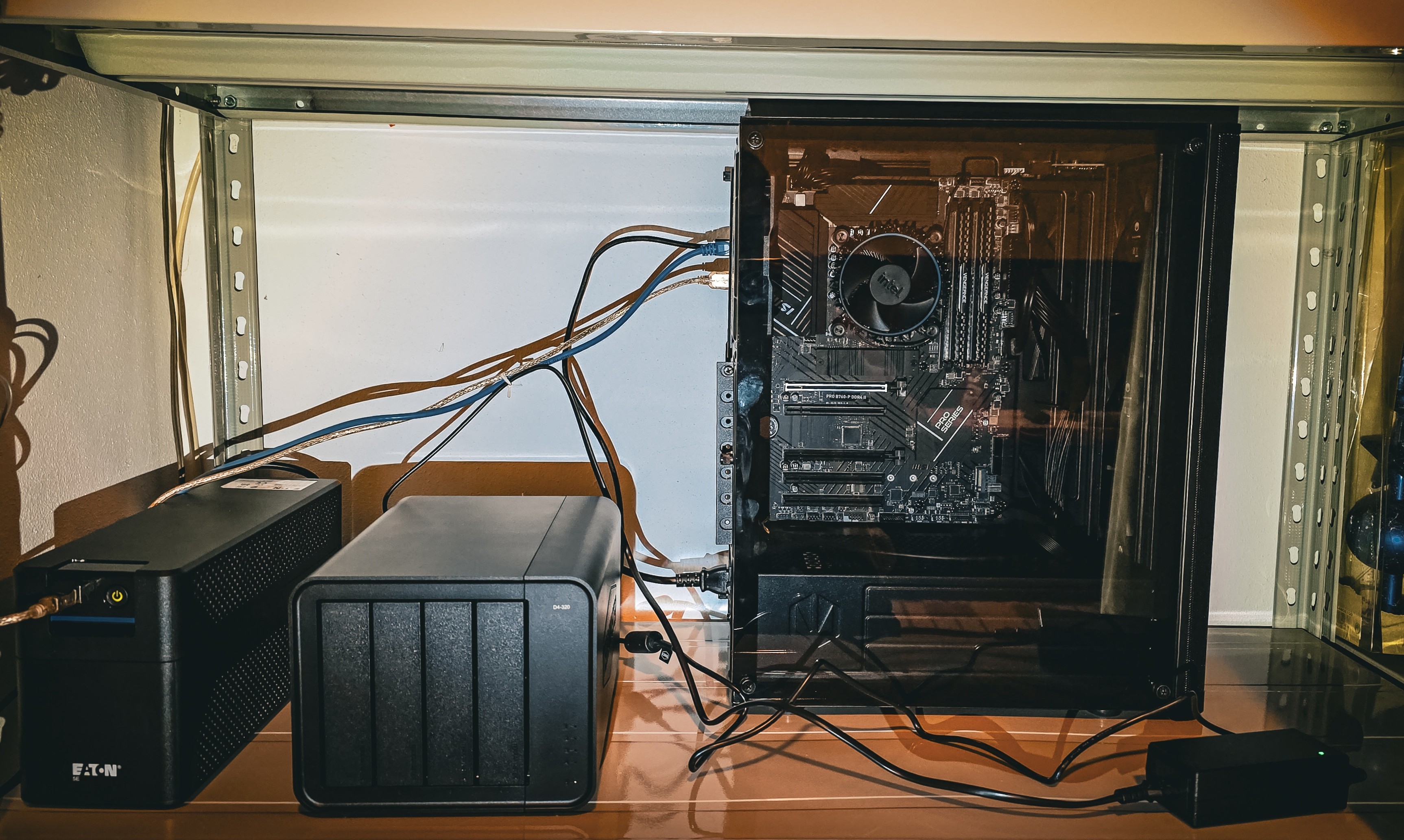
Proxmox VE on a full desktop build. The complete parts list:
| Component | Model |
|---|---|
| Case | ENDORFY Ventum 200 Air |
| Motherboard | MSI PRO B760-P DDR4 |
| CPU | Intel Core i5-12400 (UHD Graphics 730) |
| RAM | Corsair 2 × 16 GB DDR4 |
| PSU | MSI MAG A650GLS PCIE5 |
| Boot drive | SanDisk Extreme 500 GB M.2 NVMe |
| Storage (RAIDZ) | 3 × Seagate IronWolf 8 TB → ~15 TB usable |
| Storage (media) | 2 × Seagate IronWolf 4 TB via Terramaster D4-320 → ~3.3 TB usable |
| UPS | Eaton 5E Gen2 700 USB DIN |
Previous (retired): Beelink MINI-S13 Pro (N100, 16 GB) — died after a few months, likely SSD overheating.
Virtualization & architecture
Proxmox VE handles the hypervisor layer. A single Ubuntu Server VM acts as the Docker host for all services:
- Snapshot backups: Proxmox takes weekly VM-level snapshots for point-in-time recovery of the entire system.
- Resource isolation: The VM gets dedicated vCPUs and RAM. The hypervisor stays lean and doesn't compete with Docker for resources.
- ZFS flexibility: The RAIDZ pool is managed at the Proxmox level and passed through to the VM as a virtual disk.
Networking & security
External traffic goes through Cloudflare Tunnel (cloudflared). The tunnel connects outbound from the server to Cloudflare's edge — no inbound firewall rules are needed. Behind the tunnel, Nginx Proxy Manager routes traffic to the appropriate container based on domain. This also makes Cloudflare Access policies available for additional authentication on sensitive services.
For admin interfaces and SSH, Tailscale provides a WireGuard-based mesh VPN. The server also acts as an exit node for my devices when needed.
Security stack: Cloudflare filters edge traffic → tunnel terminates at Nginx Proxy Manager → CrowdSec analyzes requests for malicious patterns → Pi-hole handles DNS-level blocking on the LAN. Management interfaces stay on the Tailscale mesh.
Services
Everything runs in Docker containers across several compose stacks. Here's what I use daily:
Cloud & storage
| Service | Purpose |
|---|---|
| Nextcloud | File sync, calendar, contacts — Google Drive replacement |
| Immich | Photo and video backup with ML-powered search and face recognition |
| AFFiNE | Knowledge base and workspace — this documentation lives here |
Media
| Service | Purpose |
|---|---|
| Jellyfin | Stream movies and TV to any device (hardware transcoding via Intel QSV) |
| Navidrome | Personal music streaming, compatible with any Subsonic client |
| Kiwix | Offline Wikipedia and ZIM library reader |
Monitoring & admin
| Service | Purpose |
|---|---|
| Glance | Personal dashboard showing all service statuses |
| Beszel | Lightweight system-wide resource monitoring |
| Uptime Kuma | Service health checks with Telegram notifications |
| Pi-hole | Network-wide ad blocking and local DNS |
| CrowdSec | Collaborative intrusion prevention |
| Speedtest Tracker | Internet speed history and trends |
Productivity & utilities
| Service | Purpose |
|---|---|
| Home Assistant | Home automation — lights, sensors, smart home control |
| Stirling PDF | PDF merge, split, compress, convert (all client-side, no upload) |
| FreshRSS | RSS feed aggregator |
| Anki Sync Server | Spaced-repetition flashcard sync across devices |
| Whisper UI | Local AI audio transcription, no data sent externally |
| Super Productivity | Time tracking and task management |
Data flow: Services that handle personal data (photos, documents, audio) run completely locally. No file leaves the server unless explicitly shared. The only outbound path is through Cloudflare's encrypted tunnel.
Docker networking
Each compose stack gets its own isolated bridge network. Docker's default address pool is configured with two /16 blocks (10.10.0.0/16 and 10.20.0.0/16), providing 512 usable /24 subnets — enough headroom to avoid subnet conflicts as new stacks are added.
Storage & backups
Data follows a three-tier model:
- Tier 1 — RAIDZ pool (3 × 8 TB): Application data, databases, configs, personal documents. Protected against a single disk failure.
- Tier 2 — Single disk (4 TB): Media files — movies, music, downloads. No RAID, since media is replaceable.
- OS tier — SSD (512 GB): Docker images, databases, OS — fast access for performance-sensitive workloads.
Backups follow a layered strategy:
- Nightly DB dumps: automated script dumps PostgreSQL databases (Immich, AFFiNE) to the RAIDZ pool
- Weekly VM snapshots: Proxmox creates a full VM-level snapshot after dumps complete
- Weekly encrypted offsite: pushed to Google Drive, encrypted before upload
- Physical cold backup: periodic manual copy to an external HDD stored offline
Old dumps older than 30 days are cleaned automatically.
What I learned
Practical takeaways from building and running this:
- Zero-trust networking works: Cloudflare Tunnel + Tailscale eliminates the need for open ports while keeping everything accessible.
- Docker Compose over Kubernetes: For a single node, compose files are simpler and don't add unnecessary abstraction. I'd reassess at 3+ nodes.
- Snapshots are not backups: VM snapshots protect against config drift; offsite encrypted backups protect against fire, theft, and hardware failure. Both are needed.
- Hardware transcoding is non-negotiable: The N100's software transcoding experience was the reason I rebuilt. The i5-12400's iGPU handles multiple 4K transcodes without breaking a sweat.
What's next
The setup has been stable for months. Idle power draw sits around 45–55 W for the whole stack (server + DAS + switch), which is low enough that I don't think about it. No hardware upgrades planned — the RAIDZ pool has plenty of headroom at 8% used, and the i5 handles everything I throw at it.
Some ideas I'm sitting on:
- Full infrastructure monitoring: I'm running Beszel for basic metrics, but a proper Grafana dashboard with long-term Prometheus storage would make capacity planning easier.
- Automated cold backups: I'm moving from manual HDD copies to a dedicated Proxmox Backup Server (PBS) on a separate device to fully automate the process.
- Kubernetes evaluation: A lightweight K3s cluster on a couple of Raspberry Pis or thin clients, just to learn the orchestration layer without risking the main stack.